Use your Android as a Bluetooth mouse, keyboard and remote
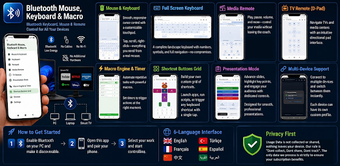
Bluetooth Mouse KeyboardMacro, from DolceFarNiente Mondo, turns an Android handset into a wireless remote peripheral for desktops, media boxes, and smart displays. The app controls pointer and text input over a Bluetooth link so you can operate a distant device without installing host software. Core controls include an on-screen touch surface, typing input, and dedicated media and slideshow navigation. Presenters and power users who need phone-based remote control and automation gain immediate value.
Compatibility reaches desktop, TV, and mobile receivers that accept external peripherals
The app uses the Bluetooth Human Interface Device profile, so it pairs with hosts that accept standard input devices. Supported receivers in practice include Windows, macOS, Linux, Android TV, and iOS devices that recognize external mice and keyboards. The receiving device must implement Bluetooth HID for pairing to succeed; otherwise the phone cannot emulate hardware input. Cross-platform receiver support removes the need for platform-specific clients on the host.
Bluetooth adapter quality determines responsiveness and usable range
User reports note that performance varies with the host Bluetooth hardware, a limitation tied to radio quality rather than the controller itself. Typical range follows standard Bluetooth limits, roughly ten meters in unobstructed conditions. Because the host sees the phone as an input peripheral, there is no continuous host-side process consuming CPU; perceived lag most often traces to radio interference or a weak adapter on the receiving device.
The macro engine automates complex input sequences but needs careful testing
The integrated macro recorder captures sequences of keystrokes and pointer actions and assigns them to buttons for one-tap playback. Setup follows an in-app recording flow where you record the sequence and save it for later triggers. This enables repetitive workflows and presentation automation, though automation reliability depends on the target environment so testing macros before critical runs is advisable.
Basic pairing is simple; advanced automation requires moderate technical familiarity
Pairing follows standard Bluetooth pairing steps, so basic remote control use suits nontechnical users. Creating reliable automation requires understanding timing and input order, because recorded sequences replay exactly as recorded. Presentation-oriented controls provide simplified slide navigation and media buttons for live use, while power users can tune macro timing and button assignments inside the app for more complex tasks.
Practical choice for mobile remote control, best with a stable Bluetooth adapter
Bluetooth Mouse KeyboardMacro is a practical option for presenters and power users who need a phone-based remote peripheral. Its mobile-driven approach suits media control and scripted input, but real-world reliability depends on the receiving device's Bluetooth adapter and radio environment. For dependable results, pair to a modern adapter, test connections in the intended location, and trial automation sequences before live use.
Pros
Uses standard Bluetooth HID so hosts accept it as an external peripheral
Built-in macro recorder captures keystroke and pointer sequences
Dedicated presentation and multimedia control layouts for live sessions
No host-side client required when the receiver supports Bluetooth HID
Cons
Responsiveness varies with the receiving device's Bluetooth hardware
Range constrained by standard Bluetooth limits, roughly ten meters
Automation reliability requires testing in the target environment
Laws concerning the use of this software vary from country to country. We do not encourage or condone the use of this program if it is in violation of these laws. Softonic may receive a referral fee if you click or buy any of the products featured here.